
How to Render Wallpaper at the Right Scale with AI
Getting wallpaper scale right in an AI render is less about size and percentages and more about telling the model how many pattern repeats you want across the wall. Here's the method.


To get wallpaper to sit at the right scale in an AI render, stop describing size and percentages and tell the model how many full pattern repeats you want across each wall section. A repeat count is the one kind of size instruction these models act on reliably, because they read numbers loosely but handle small counts far better than percentages or "make it smaller." Back it up with a relative size and a percentage, then trust your eye and iterate.
If you render your interior design concepts with AI, you've probably fought to get the scale of it right. The room looks almost right, and then your eye snags on the pattern. The motif is blown up so large it reads like a mural, or shrunk so small the wall turns to static. You type "make it smaller," then "make it bigger," then throw a percentage at it, and nothing works.
AI rendering has become part of how many interior designers work. It's fast, cheap, and it gets a concept in front of a client without too much effort to know if you're headed in the right direction. Wallpaper is one area where AI rendering tends to be a little more stubborn. Scaling a pattern with AI can feel unforgiving, and the eye knows immediately when it is off. Here is how to get it right.
Why AI gets wallpaper scale wrong
AI image models do not think in inches. They were never trained on the real dimensions of a room or the repeat length of a wallpaper, so there is no internal ruler to turn "50% smaller" into an actual change on the wall. Scale in an AI render is something that emerges from the image, not a setting the model can dial.
Why percentages don't control pattern scale
It gets more specific than that. The part of the model that reads your prompt is good at concepts and bad at numbers. When researchers tested these systems on quantities, they found the text the model reads barely registers the difference between one number and the next. Put it this way: swap "50%" for "30%" and the instruction the model actually receives is nearly identical. So a percentage does not land as a precise target. It lands as a vague nudge toward "smaller pattern," and the model fills in the rest from the images it has seen.
Why "make it smaller" doesn't work on AI renders
"Make it bigger" and "make it smaller" have the same problem, plus one more. When you edit a render, the model is not adjusting the previous pattern. It reads the current image and your instruction and generates a fresh result that leans toward examples of "small pattern." It never stored the old size as a number, so there is nothing to make 20% smaller than. That is why the loop rarely settles: each "smaller" is a new guess, not a step down from the last one.
Can AI count? And why it matters for wallpaper
Counting is the one place these models do a little better, and only in a narrow way. Research on their numerical reasoning finds they are most accurate with small quantities and weakest with fractions, and a separate counting benchmark shows accuracy drops steadily as the number of objects rises. That is the whole trick here. A wallpaper repeat count lives in the small-number range the model handles least badly, which is why "two or three repeats across the wall" gives you more control than any percentage. It is not precise, but it is the kind of instruction the model is best equipped to act on.
The fix is to stop describing the size and start describing what the size produces.
The fix: describe repeats, not size
The most reliable way to control wallpaper scale in an AI render is to tell the model how many times the pattern should repeat across a wall. A repeat count is something it can actually act on, because it is countable and visible. "Two and a half full repeats across each wall section" gives the model a target it can check itself against. "Smaller" does not.
That single shift, from size language to repeat language, is what turns wallpaper rendering from a slot machine into something closer to a tool.
The three-part wallpaper prompt
Give the model three things, in this order of importance.
First, a repeat count. How many full pattern repeats do you want visible across each wall section? This is the number the model can act on, so it does the heavy lifting.
Second, a relative size in plain words. Small, medium, or large-scale motifs. This backs up the repeat count with a description the model already associates with pattern imagery.
Third, a percentage of the pattern's native scale. On its own, a percentage does almost nothing, but paired with the other two, it nudges the result in the right direction.
A prompt you can copy
Put those three together, and you get something like this:
Render the pattern at 60% of its native scale, so the motifs are medium-sized and roughly 2 to 2 and a half full pattern repeats are visible across each wall section.
Notice the repeat count is doing the real work. The size word and the percentage are there to support it, not to carry it. Start there, look at the result, and adjust the repeat count first when it is off.


Wallpaper: Meadow Wallpaper in Gold, The Lawns Co.
Organic patterns versus geometric ones
This method works best on organic patterns, florals, damasks, botanicals, anything with a loose, flowing motif. The model has a lot of room to interpret and still land somewhere believable.
Geometric patterns are harder. Grids, stripes, and tight repeats demand a precision the model does not always deliver, and small errors are obvious because your eye expects the lines to be regular. When you are rendering a geometric wallpaper, expect to iterate more, and lean harder on the repeat count than on the percentage.
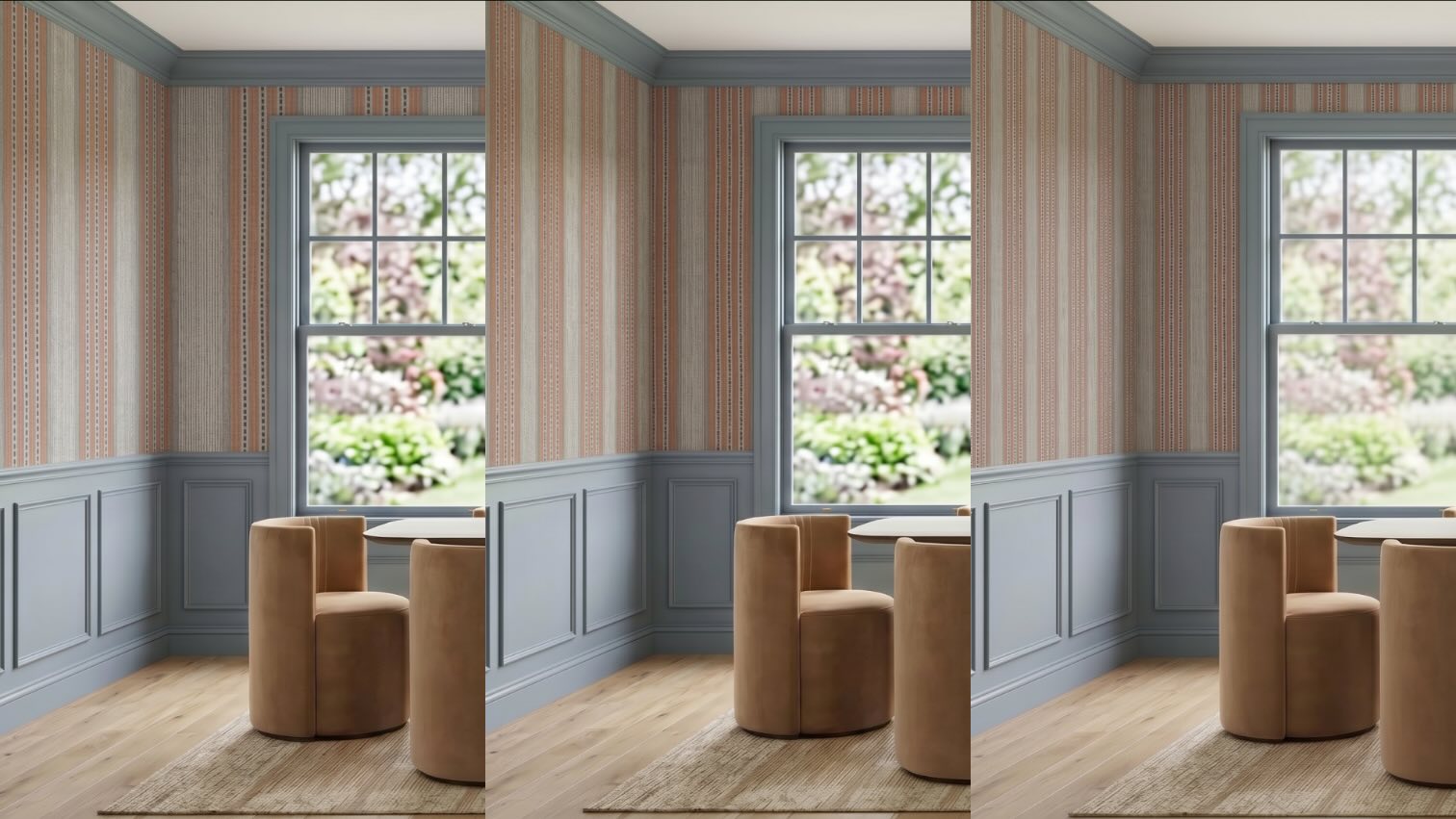
Wallpaper: Lucia Stripe Wallpaper in Cigar, The Lawns Co.
When to cheat the numbers
One rule matters more than any prompt formula: trust your eye over the math. The numbers are a starting point, not a contract. If the render looks right at three repeats even though your real wallpaper would show two, use three. The goal is a render that reads correctly and helps your client see the room, not a technically perfect one. Cheat the numbers whenever cheating gets you there faster.
A quick workflow for scaling wallpaper
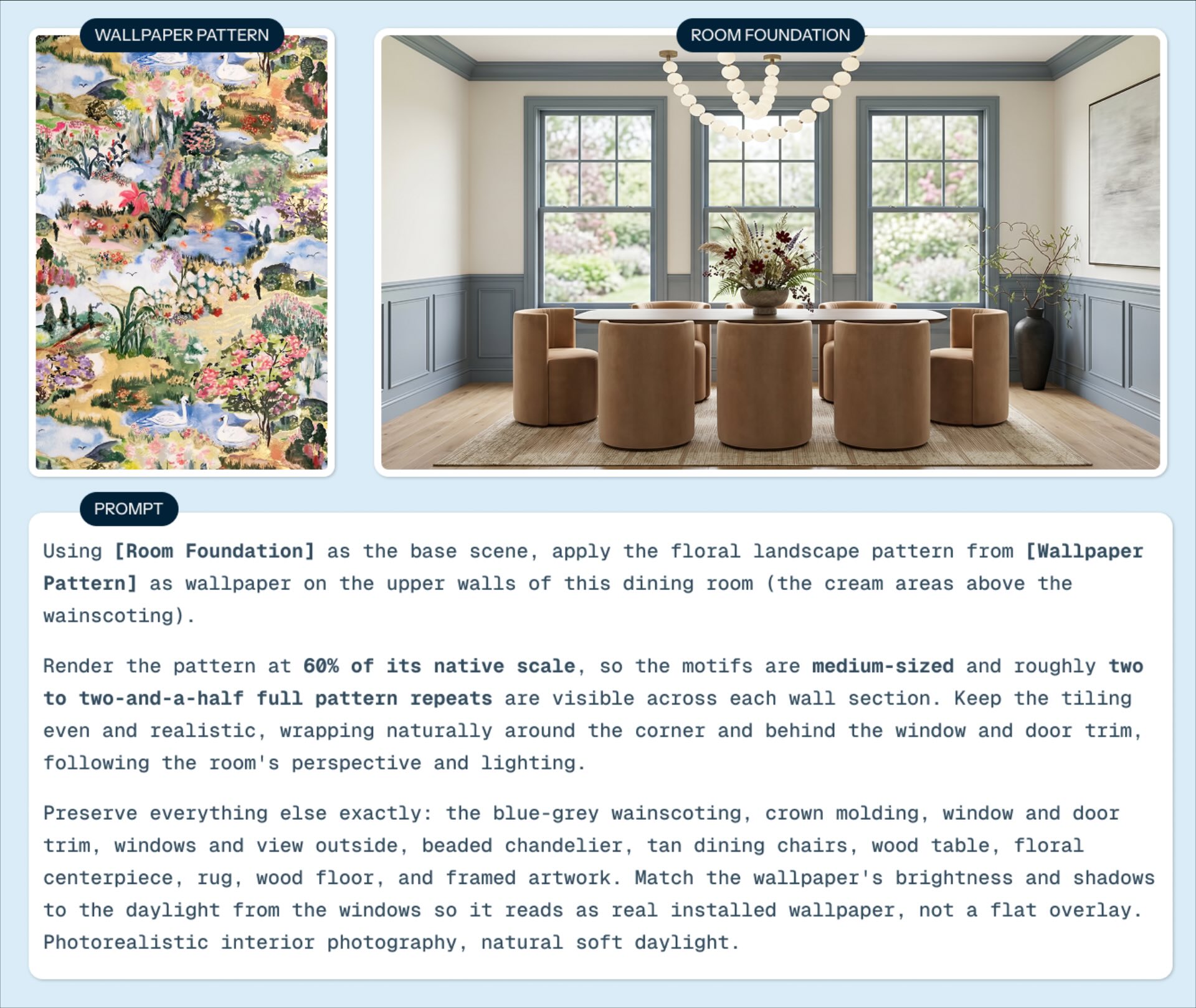
If you want a repeatable process rather than a one-off fix, this is a good loop:
Start from a clear reference of the wallpaper (ideally a seamless pattern) so the model has the real motif to work from.
Establish the structure of the room first, so the model has a sense of the wall it is filling.
Apply the wallpaper by describing the pattern in repeats first, then add the size word and percentage.
Render, then correct one variable at a time. Change the repeat count before you touch anything else.
Stop when it reads right to your eye, not when the math is perfect.
To avoid your wallpaper or image going fuzzy due to generation loss read this article.
Why this matters
An AI render is a communication tool, not a replacement for your judgment. Wallpaper at the right scale helps a client see a direction early, react to it honestly, and get on the same page with you before making expensive decisions. The value is not the pretty picture. It's the conversation the picture makes possible.
That is the same reason we build Glintera. So much of the friction in a residential project comes from a gap between what a client can picture and what they can say. A clean render helps close that gap on your side of the table. Getting a clear read on your client's taste before you design closes it on theirs.
Try it on your next concept
Pick one render where the wallpaper has been fighting you and rewrite the prompt in repeats. That is usually all it takes.
If you want more workflow tips like this one, join The Glint, our newsletter for working interior designers. It is short, practical, and built around the business and craft of running a studio.
And if the taste-communication side is where your projects get stuck, Glintera helps you understand what a client wants before you start. Get early access here.
Products in the images
The wallpaper and furniture shown in the renders throughout this article:
Lucia Stripe Wallpaper in Cigar, The Lawns Co.
Meadow Wallpaper in Gold, The Lawns Co.
Georgina Dining Chair, McGee & Co.
Theo Dining Table, PA Philly Furniture
FAQ
How do I fix wallpaper scale in an AI render?
Stop asking the model to make the pattern bigger or smaller and tell it how many full pattern repeats you want across each wall section instead. Back that repeat count up with a relative size, small, medium, or large, and a percentage of the pattern's native scale. The repeat count is the part the model can actually act on.
Why does AI get wallpaper scale wrong so often?
These models were never trained on real measurements, and studies that test them on numbers find they barely distinguish one value from another. So a percentage, or a vague "smaller," gives them nothing to anchor to. Describing the pattern as a number of repeats gives them something they can actually act on.
Can AI count pattern repeats?
Roughly, and only for small numbers. Research shows image models are most accurate with small quantities and unreliable with large numbers and fractions. That narrow strength is exactly why "two or three repeats across the wall" works better than a percentage. Nudge it toward the count you want rather than trusting the first result.
Why doesn't "make it smaller" work when editing an AI render?
Because the model does not adjust your existing image. It generates a new one guided toward examples of "small pattern," with no memory of the previous size to shrink. That is why repeated "smaller" prompts drift instead of dialing in. Give it a repeat count to aim for instead.
Does this work for geometric wallpaper too?
Yes, but expect more iteration. Geometric patterns demand a regularity the model does not always hold, and errors are more obvious to the eye. Lean on the repeat count and adjust more than you would with an organic pattern.
{"@context":"https://schema.org","@type":"FAQPage","mainEntity":[{"@type":"Question","name":"How do I fix wallpaper scale in an AI render?","acceptedAnswer":{"@type":"Answer","text":"Stop asking the model to make the pattern bigger or smaller and tell it how many full pattern repeats you want across each wall section instead. Back that repeat count up with a relative size and a percentage of the pattern's native scale. The repeat count is the part the model can actually act on."}},{"@type":"Question","name":"Why does AI get wallpaper scale wrong so often?","acceptedAnswer":{"@type":"Answer","text":"These models were never trained on real measurements, and studies that test them on numbers find they barely distinguish one value from another. So a percentage, or a vague 'smaller', gives them nothing to anchor to. Describing the pattern as a number of repeats gives them something they can act on."}},{"@type":"Question","name":"Can AI count pattern repeats?","acceptedAnswer":{"@type":"Answer","text":"Roughly, and only for small numbers. Research shows image models are most accurate with small quantities and unreliable with large numbers and fractions. That narrow strength is why 'two or three repeats across the wall' works better than a percentage. Nudge it toward the count you want rather than trusting the first result."}},{"@type":"Question","name":"Why doesn't 'make it smaller' work when editing an AI render?","acceptedAnswer":{"@type":"Answer","text":"Because the model does not adjust your existing image. It generates a new one guided toward examples of small-scale pattern, with no memory of the previous size to shrink. That is why repeated 'smaller' prompts drift instead of dialing in. Give it a repeat count to aim for instead."}},{"@type":"Question","name":"Does this work for geometric wallpaper too?","acceptedAnswer":{"@type":"Answer","text":"Yes, but expect more iteration. Geometric patterns demand a regularity the model does not always hold, and errors are more obvious to the eye. Lean on the repeat count and adjust more than you would with an organic pattern."}}]}
